Have you ever worked with a customer that had multiple Citrix license servers and product editions? I worked with a client recently that had upgraded their Citrix XenApp product licenses from Enterprise to Platinum and had moved to a new Citrix license server. Their problem was that they, over the years, had an unknown number of XenApp servers that had been manually configured to use various license servers and product editions. Their problem was compounded by having well over 100 XenApp 5 servers. The XenApp servers were segregated into folders based on Zone name and sub-folders based on application silo name. Manually checking every XenApp server in the Delivery Services Console would have taken a very long time. My solution was a Microsoft PowerShell script.
Being fairly new to PowerShell, but having a software development background, I knew this should be a very simple script to produce. The client simply wanted a list of XenApp servers so they could look at the license server name and product edition. The basics of the script are shown here (lines may wrap):
$Farm = Get-XAFarmConfiguration
$Servers = Get-XAServer
ForEach($Server in $Servers)
{
        $ServerConfig = Get-XAServerConfiguration -ServerName $Server.Servername
        Echo "Zone: " $server.ZoneName
        Echo "Server Name: " $server.ServerName
        Echo “Product Edition: “  $server.CitrixEdition
        If( $ServerConfig.LicenseServerUseFarmSettings )
        {
               Echo "License server: " $Farm.LicenseServerName
        }
        Else
        {
               Echo "License server: " $ServerConfig.LicenseServerName
        }
        Echo “”
}
Note: This script is only valid for XenApp 5 for both Server 2003 and Server 2008. In XenApp 5, it is possible to edit each XenApp server and set a specific Citrix license server. You could, in fact, have every XenApp server in a XenApp farm configured to use its own Citrix license server. In XenApp 6, you can do the same thing but that would require the use of Citrix Computer polices, one for each server.
While the above script worked, it was almost useless. With an extremely large number of servers, the output produced was unwieldy. The customer gave me the product edition and license server name they wanted to validate against. I updated the script with that new information and needed a way to filter the data. PowerShell uses the traditional programming “If” statement to allow filtering the data as it is processed. I added a variable for the license server name and an “If” statement to the script as shown below (PowerShell uses the character for line continuation. ):
<pre>$LicenseServerName = NEWLICCTX01.WEBSTERSLAB.COM
$Farm = Get-XAFarmConfiguration
$Servers = Get-XAServer
ForEach($Server in $Servers)
{
$ServerConfig = Get-XAServerConfiguration -ServerName $Server.Servername
If(($Server.CitrixEdition -ne "Platinum") -or
($ServerConfig.LicenseServerUseFarmSettings -eq $False `
–and $ServerConfig.LicenseServerName -ne $LicenseServerName))
{
<snip>
}
}
The “If” statement says:
- If the server’s product edition is not equal to “Platinum”
- Or, the server is not configured to use the farm settings for the license server and the server’s license server name is not equal to NEWLICCTX01.WEBSTERSLAB.COM
- Output the server’s information
- If neither condition is met, skip to the next entry in the list of servers
The new script allowed me to output just the XenApp servers matching the client’s criteria.
Sample output:
Zone: ZONE1
Server Name: Z1DCCTXSSO01A
Product Edition: Platinum
License server: oldlicctx01
Zone: ZONE7
Server Name: Z7DCTRMCTX03J
Product edition: Enterprise
License server: NEWLICCTX01.WEBSTERSLAB.COM
Note: The license server names shown in the sample output reflect the entry in the License Server name field for each XenApp server. XenApp allows as valid entries the NetBIOS name, Fully Qualified Domain Name or IP Address.
Sweet, I have what the client needs, now let me just output this to HTML and I am done.
M:\PSScripts\Get-ServerInfo.ps1 | ConvertTo-Html | Out-File M:\PSScripts\MismatchedServers.html
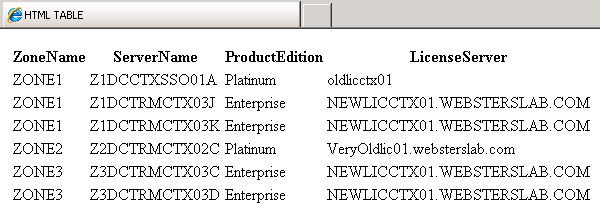
This produced the following:
|
* |
| 112 |
What the…?
I needed to find out what was going on here. I typed in Get-ServerInfo.ps1 | Get-Member
TypeName: System.String

Name       MemberType            Definition
----             ----------            ----------
Clone            Method                System.Object Clone()
CompareTo        Method                int CompareTo(System.Object value), int CompareTo(string strB)
Contains         Method                bool Contains(string value)

<snip>
Next, I typed in Get-Help ConvertTo-HTML:
PS Z:\> Get-Help ConvertTo-HTML
NAME
ConvertTo-Html
SYNOPSIS
Converts Microsoft .NET Framework objects into HTML that can be displayed in a Web browser.
<snip>
What I see from these two pieces of information is that my script is outputting String (or text) and ConvertTo-Html is expecting an Object as input.
Oh, now I get it. The light-bulb finally went off: PowerShell wants OBJECTS, not Text. DOH!!!
OK, so how do I change this script to output objects instead of text? I found what I needed in Chapter 19 of Don Jones’ book Learn Windows PowerShell in a Month of Lunches. This is going to be a lot easier than I thought because I am only working with four pieces of data.
All I had to do was change:
Echo "Zone: " $server.ZoneName
Echo "Server Name: " $server.ServerName
Echo “Product Edition: “  $server.CitrixEdition
If( $ServerConfig.LicenseServerUseFarmSettings )
{
       Echo "License server: " $Farm.LicenseServerName
}
Else
{
       Echo "License server: " $ServerConfig.LicenseServerName
}
Echo “”

To:

$obj = New-Object -TypeName PSObject
$obj | Add-Member -MemberType NoteProperty `
-Name ZoneName -Value $server.ZoneName
$obj | Add-Member -MemberType NoteProperty `
-Name ServerName -Value $server.ServerName
$obj | Add-Member -MemberType NoteProperty `
-Name ProductEdition -Value $server.CitrixEdition
If($ServerConfig.LicenseServerUseFarmSettings)
{
       $obj | Add-Member -MemberType NoteProperty `
    -Name LicenseServer -Value $Farm.LicenseServerName
}
Else
{
       $obj | Add-Member -MemberType NoteProperty `
    -Name LicenseServer -Value $ServerConfig.LicenseServerName
}
Write-Output $obj
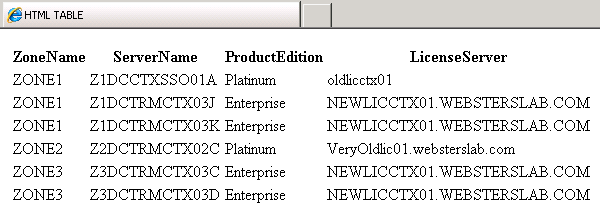
Running the command M:\PSScripts\Get-ServerInfo.ps1 | ConvertTo-Html | Out-File M:\PSScripts\MismatchedServers.html, now gives me the following results (Figure 1).
Perfect. Now that the script is using objects for output, any of the ConvertTo-* or Export-To* cmdlets can be used. But I wanted to take this adventure one step further. The script uses a hard-coded license server name and product edition. I want to turn the script into one that can be used by anyone and also make it an advanced function.
The first thing needed is a name for the function. The purpose of the function is to Get XenApp Mismatched Servers. Following the naming convention used by Citrix, Get-XANoun, the name could be Get-XAMismatchedServer. Why XAMismatchedServer and not XAMismatchedServers? PowerShell convention is to use singular and not plural.
Function Get-XAMismatchedServer
{
#PowerShell statements
}
There is more functionality that needs to be added to make this a more useful function. Additionally, I want to learn how to turn this function into a proper PowerShell advanced function. Some of the additions needed are:
- Prevent the function from running on XenApp 6+
- Allow the use of a single XenApp Zone to restrict the output
- Validate the Zone name entered
- Change the function to use parameters instead of hardcoded values
- Add debug and verbose statements
- Add full help text to explain the function
For the basis of turning this simple function into an advanced function, I am using Chapter 48 of Windows PowerShell 2.0 TFM by Don Jones and Jeffery Hicks.
The first thing I need to add to the function is the statement that tells PowerShell this is an advanced function.
Function Get-XAMismatchedServer
{
    [CmdletBinding( SupportsShouldProcess = $False, `
    ConfirmImpact = "None", DefaultParameterSetName = "" ) ]
}
Even though all parameters in CmdletBinding() are the defaults, I am including them solely for the learning exercise.
I will also need two “helper” functions. One to verify the version of XenApp the script is being run under and the other for validating the Zone name entered (if one was entered). These two functions need to be declared before they are used. This means they need to be at the top of the script.
The function to verify if the script is running under XenApp 5:
Function IsRunningXenApp5
{
   Param( [string]$FarmVersion )
   Write-Debug "Starting IsRunningXenApp5 function"
   $XenApp5 = $false
   If($Farm.ServerVersion.ToString().SubString(0,1) -ne "6")
   {
     #this is a XenApp 5 farm, script can proceed
     $XenApp5 = $true
   }
   Else
   {
     #this is a not XenApp 5 farm, script cannot proceed
     $XenApp5 = $false
   }
   Write-Debug "Farm is running XenApp5 is $XenApp5"
   Return $XenApp5
}
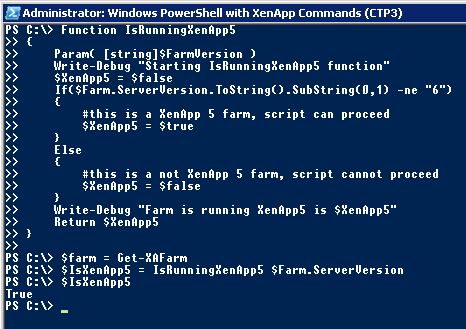
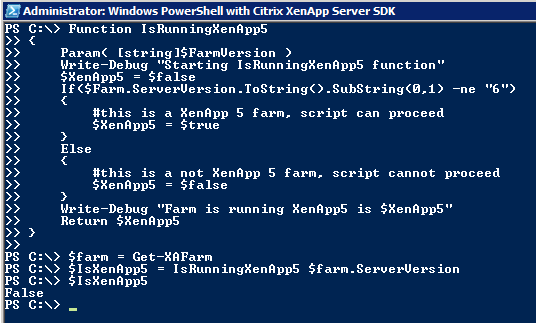
Result of function under XenApp 5 (Figure 2).
Result of function under XenApp 6 (Figure 3).
The function to verify that if a zone name is entered, it is valid:
Function IsValidZoneName
{
   Param( [string]$ZoneName )
   Write-Debug "Starting IsValidZoneName function"
   $ValidZone = $false
   $Zones = Get-XAZone -ErrorAction SilentlyContinue
   If( -not $? )
   {
     Write-Error "Zone information could not be retrieved"
     Return $ValidZone
   }
   ForEach($Zone in $Zones)
   {
     Write-Debug "Checking zone $Zone against $ZoneName"
     Write-Verbose "Checking zone $Zone against $ZoneName"
     If($Zone.ZoneName -eq $ZoneName)
     {
        Write-Debug "Zone $ZoneName is valid $ValidZone"
        $Zones = $null
        $ValidZone = $true
     }
   }
   $Zones = $null
   Return $ValidZone
}
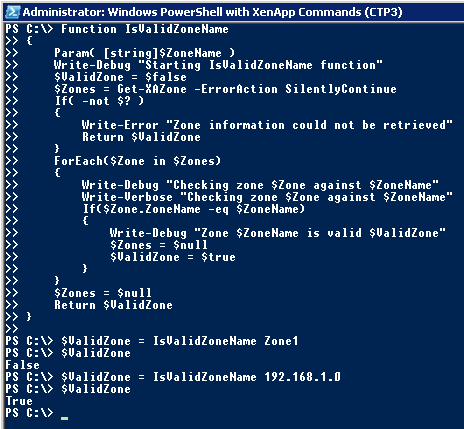
Result of the function (Figure 4).
Adding parameters to the main function:
Function Get-XAMismatchedServer
{
   [CmdletBinding( SupportsShouldProcess = $False,
   ConfirmImpact = "None", DefaultParameterSetName = "" ) ]

   Param(
   [parameter(Position = 0,Mandatory=$true,
   HelpMessage = "Citrix license server name to match" )]
   [Alias("LS")]
   [string]$LicenseServerName,
   [parameter(Position = 1, Mandatory=$true,
   HelpMessage = "Citrix product edition to match: `
   Platinum, Enterprise or Advanced" )]
   [Alias("PE")]
   [ValidateSet("Platinum", "Enterprise", "Advanced")]
   [string]$ProductEdition,
   [parameter(Position = 2,Mandatory=$false, `
   HelpMessage = "XenApp zone to restrict search.  `
   Blank is all zones in farm." )]
   [Alias("ZN")]
   [string]$ZoneName = '' )
}
Three parameters have been added: $LicenseServerName, $ProductEdition and $ZoneName. These parameter names were chosen because they are what the Citrix cmdlets use.
All three parameters are positional. This means the parameter name is not required. The function could be called as either:
Get-XAMismatchedServer -LicenseServerName CtxLic01 -ProductEdition Platinum -ZoneName EMEA
Or
Get-XAMismatchedServer CtxLic01 Platinum EMEA
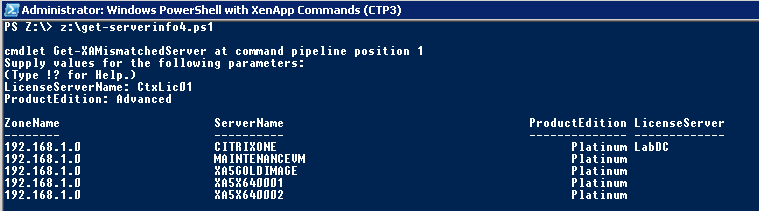
The LicenseServerName and ProductEdition parameters are mandatory (Figure 5).
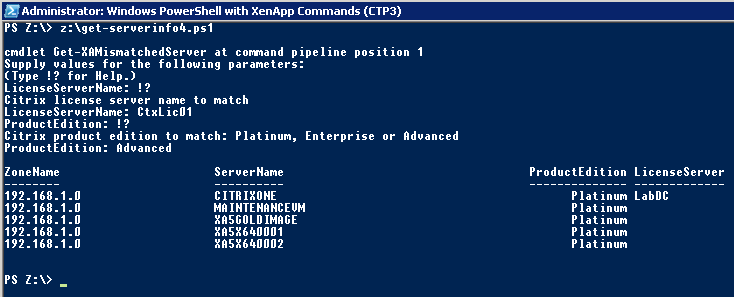
A help message has been entered so that if a parameter is missing, help text can be requested to tell what needs to be entered (Figure 6).
Complete function (lines may wrap):
Function IsRunningXenApp5
{
   Param( [string]$FarmVersion )
   Write-Debug "Starting IsRunningXenApp5 function"
   $XenApp5 = $false
   If($Farm.ServerVersion.ToString().SubString(0,1) -ne "6")
   {
     #this is a XenApp 5 farm, script can proceed
     $XenApp5 = $true
   }
   Else
   {
     #this is not a XenApp 5 farm, script cannot proceed
     $XenApp5 = $false
   }
   Write-Debug "Farm is running XenApp5 is $XenApp5"
   Return $XenApp5
}

Function IsValidZoneName
{
   Param( [string]$ZoneName )
   Write-Debug "Starting IsValidZoneName function"
   $ValidZone = $false
   $Zones = Get-XAZone -ErrorAction SilentlyContinue
   If( -not $? )
   {
     Write-Error "Zone information could not be retrieved"
     Return $ValidZone
   }
   ForEach($Zone in $Zones)
   {
     Write-Debug "Checking zone $Zone against $ZoneName"
     Write-Verbose "Checking zone $Zone against $ZoneName"
     If($Zone.ZoneName -eq $ZoneName)
     {
        Write-Debug "Zone $ZoneName is valid $ValidZone"
        $Zones = $null
        $ValidZone = $true
     }
   }
   $Zones = $null
   Return $ValidZone
}

Function Get-XAMismatchedServer
{
   <#
   .Synopsis
   Find servers not using the correct license server or
   product edition.
   .Description
   Find Citrix XenApp 5 servers that are not using the Citrix license
   server or product edition specified.  Can be restricted to a
   specific XenApp Zone.
   .Parameter LicenseServerName
   What is the name of the Citrix license server to validate servers
   against.  This parameter has an alias of LS.
   .Parameter ProductEdition
   What XenApp product edition should servers be configured to use.
   Valid input is Platinum, Enterprise or Advanced.
   This parameter has an alias of PE.
   .Parameter ZoneName
   Optional parameter.  If no XenApp zone name is specified, all zones
   in the farm are searched.
   This parameter has an alias of ZN.
   .Example
   PS C:\ Get-XAMismatchedServerInfo
   Will prompt for the Citrix license server name and product edition.
   .Example
   PS C:\ Get-XAMismatchedServerInfo -LicenseServerName CtxLic01 -ProductEdition Platinum
   Will search all XenApp zones in the XenApp 5 farm that the current XenApp 5 server
   is a member.  Any XenApp 5 server that is manually configured to use a different license
   server OR product edition will be returned.
   .Example
   PS C:\ Get-XAMismatchedServerInfo -LicenseServerName CtxLic01 -ProductEdition Platinum -ZoneName EMEA
   Will search the EMEA zone in the XenApp 5 farm that the current XenApp 5 server
   is a member.  Any XenApp 5 server that is manually configured to use a different license
   server OR product edition will be returned.
   .Example
   PS C:\ Get-XAMismatchedServerInfo -LS CtxLic01 -PE Enterprise -ZN Russia
   Will search the Russia zone in the XenApp 5 farm that the current XenApp 5 server
   is a member.  Any XenApp 5 server that is manually configured to use a different license
   server OR product edition will be returned.
   .Example
   PS C:\ Get-XAMismatchedServerInfo CtxNCC1701J Enterprise Cardassian
   Will search the dangerous Cardassian zone in the XenApp 5 farm that the current XenApp 5
   server is a member.  Any XenApp 5 server that is manually configured to use an inferior
   license server OR unworthy product edition will be returned (hopefully in one piece).
   .ReturnValue
   [OBJECT]
   .Notes
   NAME:         Get-XAMismatchedServerInfo
   VERSION:      .9
   AUTHOR:       Carl Webster (with a lot of help from Michael B. Smith)
   LASTEDIT:   May 16, 2011
   #Requires -version 2.0
   #Requires -pssnapin Citrix.XenApp.Commands
   #>
   [CmdletBinding( SupportsShouldProcess = $False, ConfirmImpact = "None", DefaultParameterSetName = "" ) ]
   Param(       [parameter(
   Position = 0,
   Mandatory=$true,
   HelpMessage = "Citrix license server name to match" )]
   [Alias("LS")]
   [string]$LicenseServerName,
   [parameter(
   Position = 1,
   Mandatory=$true,
   HelpMessage = "Citrix product edition to match: Platinum, Enterprise or Advanced" )]
   [Alias("PE")]
   [ValidateSet("Platinum", "Enterprise", "Advanced")]
   [string]$ProductEdition,
   [parameter(
   Position = 2,
   Mandatory=$false,
   HelpMessage = "XenApp zone to restrict search.  Blank is all zones in farm." )]
   [Alias("ZN")]
   [string]$ZoneName = '' )
   Begin
   {
     Write-Debug "In the BEGIN block"
     Write-Debug "Retrieving farm information"
     Write-Verbose "Retrieving farm information"
     $Farm = Get-XAFarm -ErrorAction SilentlyContinue
     If( -not $? )
     {
        Write-Error "Farm information could not be retrieved"
        Return
     }
     Write-Debug "Validating the version of XenApp"
     $IsXenApp5 = IsRunningXenApp5 $Farm.ServerVersion
     If( -not $IsXenApp5 )
     {
        Write-Error "This script is designed for XenApp 5 and cannot be run on XenApp 6"
        Return
     }
     If($ZoneName -ne '')
     {
        Write-Debug "Is zone name valid"
        Write-Verbose "Validating zone $ZoneName"
        $ValidZone = IsValidZoneName $ZoneName
        If(-not $ValidZone)
        {
          Write-Error "Invalid zone name $ZoneName entered"
          Return
        }
     }
   }
   Process
   {
     Write-Debug "In the PROCESS block"
     If($ZoneName -eq '')
     {
        Write-Debug "Retrieving server information for all zones"
        Write-Verbose "Retrieving server information for all zones"
        $Servers = Get-XAServer -ErrorAction SilentlyContinue | `
        sort-object ZoneName, ServerName
     }
     Else
     {
        Write-Debug "Retrieving server information for zone $ZoneName"
        Write-Verbose "Retrieving server information for zone $ZoneName"
        $Servers = Get-XAServer -ZoneName $ZoneName -ErrorAction SilentlyContinue | `
        sort-object ZoneName, ServerName
     }
     If( $? )
     {
        ForEach($Server in $Servers)
        {
          Write-Debug "Retrieving server configuration data for server $Server"
          Write-Verbose "Retrieving server configuration data for server $Server"
          $ServerConfig = Get-XAServerConfiguration -ServerName $Server.Servername `
          -ErrorAction SilentlyContinue
          If( $? )
          {
             If($Server.CitrixEdition -ne $ProductEdition -or `
              ($ServerConfig.LicenseServerUseFarmSettings -eq $False -and `
              $ServerConfig.LicenseServerName -ne $LicenseServerName))
             {
               Write-Debug "Mismatched server $server"
               Write-Verbose "Mismatched server $server"
               $obj = New-Object -TypeName PSObject
               $obj | Add-Member -MemberType NoteProperty `
                  -Name ZoneName -Value $server.ZoneName
               $obj | Add-Member -MemberType NoteProperty `
                  -Name ServerName -Value $server.ServerName
               $obj | Add-Member -MemberType NoteProperty `
                  -Name ProductEdition -Value $server.CitrixEdition
               If($ServerConfig.LicenseServerUseFarmSettings)
               {
                  $obj | Add-Member -MemberType NoteProperty `
                    -Name LicenseServer -Value $Farm.LicenseServerName
               }
               Else
               {
                  $obj | Add-Member -MemberType `
                    NoteProperty -Name LicenseServer `
                    -Value $ServerConfig.LicenseServerName
               }
               Write-Debug "Creating object $obj"
               write-output $obj
            }
          }
          Else
          {
             Write-Error "Configuration information for server `
                   $($Server.Servername) could not be retrieved"
          }
        }
     }
     Else
     {
        Write-Error "Information on XenApp servers could not be retrieved"
     }
   }
   End
   {
     Write-Debug "In the END block"
     $servers = $null
     $serverconfig = $null
     $farm = $null
     $obj = $null
   }
}